
See the income statement
The income statement shows the income and the costs of a period. It adds the posted entries by the statement lines of the chart of accounts. You must have the View financial statements permission to see the Income statement page.
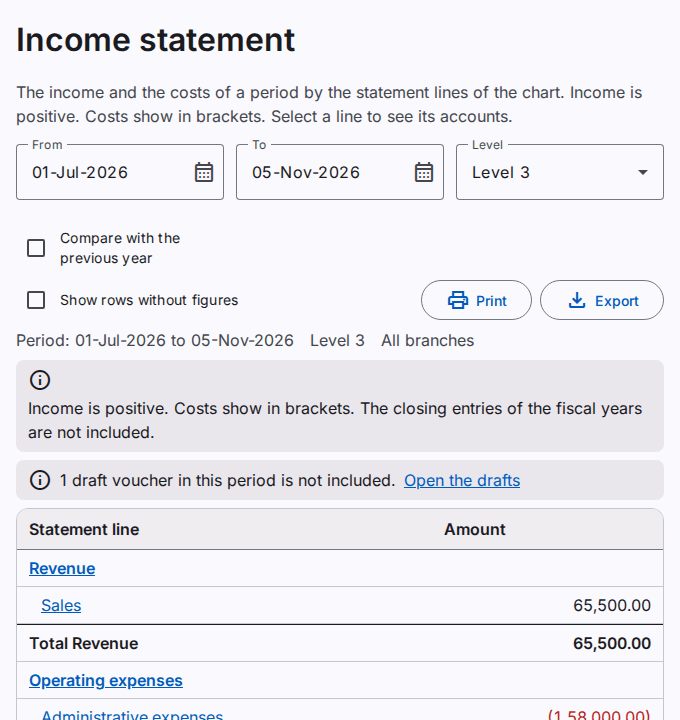
See the income statement of a period
- Type the first and the last date of the period. The default is from the start of the fiscal year to today. Refer to Type dates and amounts quickly.
- Select the Level. Levels 1 to 3 show the statement lines. Lines and accounts also shows the accounts of each line.
- To add a column with the same period of the previous year, select Compare with the previous year.
Income is positive. Costs show in brackets. A line with lines below it shows a heading, the lines, and a Total row. After the cost of sales, the Gross profit row shows the revenue minus the cost of sales. This row shows only when the period has a cost of sales. The last row, Profit or loss for the period, adds all the lines. A profit is positive. A loss shows in brackets.
What the income statement includes
- The income statement includes posted entries only. When a draft voucher has a date in the period, a note above the table tells you.
- The closing entries of the fiscal years are not included. So the income statement of a closed year shows the profit or loss of the year. Refer to Lock and reopen the months.
- An account that has no statement line shows in the line Accounts without a statement line. Edit the account to give it a line. Refer to Manage the chart of accounts.
- When you work in one branch, the report shows the entries of that branch. To see the whole company, select All branches in the top bar.
Open the accounts of a line
Select the name of a line. The income statement opens again with the accounts of that line only. Select the name of an account to open its ledger for the same dates. To see all the lines again, select Show all lines.
Print or export the income statement
Select Print to make a PDF file. Select Export to save an Excel or CSV file. Refer to Print and export a report.