
See the account ledger
The account ledger shows the posted entries of an account, with the opening balance, a running balance and the closing balance. You must have the View ledger reports permission to see the Account ledger page.
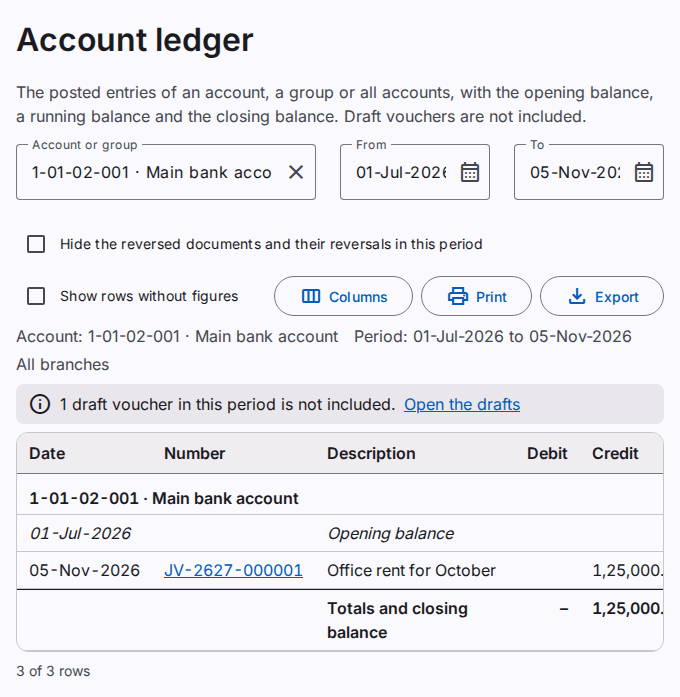
Select the account and the dates
- In Account or group, type a part of the code or the name. Select the account in the list.
- Type the first date in From. Type the last date in To.
When you select a group, the report shows each account of the group in its own section. When you select no account, the report shows all accounts. The default dates are the start of the fiscal year and today.
Read the ledger
Each account has one section:
- The Opening balance row shows the balance before the first date. It includes all the posted entries before that date, also of earlier years.
- Each entry shows the date, the number of the voucher, the description, the debit or the credit, and the balance after the entry. "Dr" is a debit balance. "Cr" is a credit balance.
- The entries are in the order of the date, then of the journal entry number.
- The last row shows the totals of the period and the closing balance.
The ledger includes posted entries only. When a draft voucher has a date in the period, a note above the table tells you. A reversed voucher shows two entries: the voucher and its reversal. The description of the reversal starts with "Reversal:".
Hide the reversed documents
Select Hide the reversed documents and their reversals in this period. The report then does not show a document and its reversal when both have a date in the period. The two entries cancel each other, so the opening balance, the totals and the closing balance do not change.
When only one of the two entries has a date in the period, the report shows that entry. Then the balances stay correct. The criteria line of the report and of the print tells you that the option is on.
Open a voucher
Select the number of an entry. The voucher opens. You must have the View journal vouchers permission.
Show more rows
The page shows 200 rows at a time. To see the next rows, select Show more rows below the table.
Show more columns
- Select Columns.
- Select Journal entry or Branch.
Print or export the ledger
Select Print to make a PDF file. Select Export to save an Excel or CSV file. Refer to Print and export a report.