
Find the history of a document
The Document history page shows what happened to the documents of the company: who made, changed, posted, reversed, corrected, printed or deleted each document, and when. The newest action shows first. You must have the View change history permission.
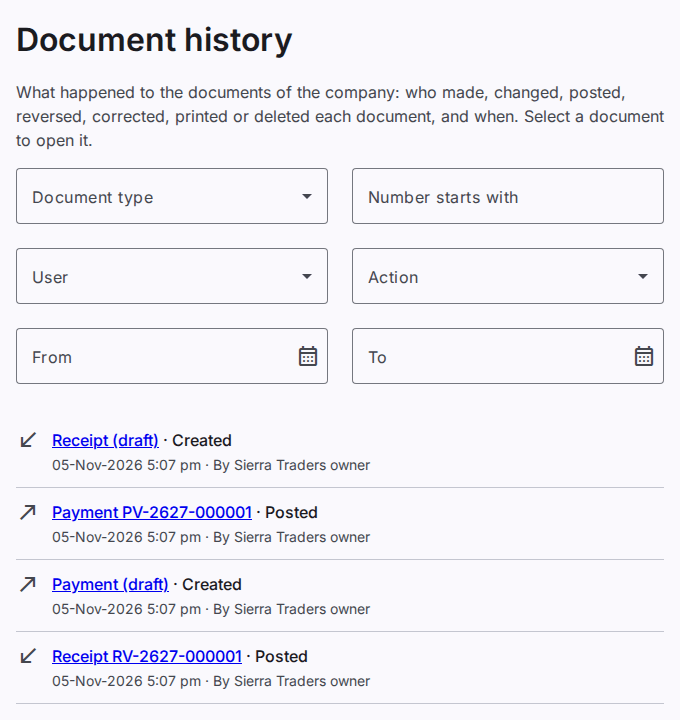
The page shows the journal vouchers, the opening balances, the receipts, the payments, the transfers and the party set-offs.
Find the history of a document
- In Number starts with, type the number of the document or the start of the number. For example, type
JV-2627-0000. - The list shows all the actions on each document with that number. The list also shows the actions before the document had a number, for example when the draft was made.
Filter the history
You can use one or more filters at the same time.
- Document type: select one type of document.
- User: select the user who did the action.
- Action: select one action, for example Posted or Printed.
- From and To: type the first and the last date of the actions.
The filters stay in the address of the page. You can keep the address and open the same list again.
Open a document
Select the type and the number of a document in the list. The document opens. You must have the view permission of the document. A deleted draft does not open.
Who sees which history
A user with the permission for the whole workspace or for the company sees the history of all the documents of the company. A user with the permission for a branch sees the history of the documents of that branch. To see the history of other records, for example the settings and the accounts, refer to See the business history.