
See the security log
The Security log page shows the sign-ins, the changes to users and roles, the ended sessions and the changes to the security policies. The newest event shows first. You must have the View security log permission.
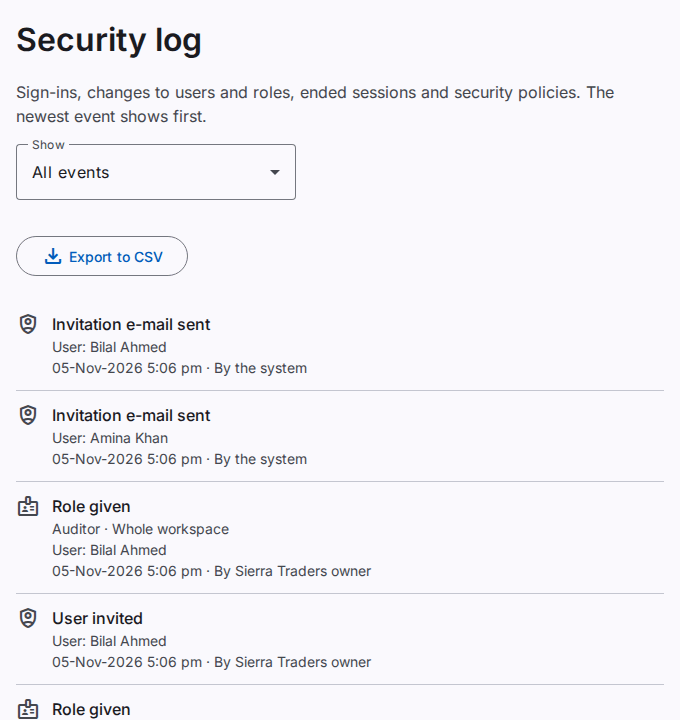
What you see
A user with the permission for the whole workspace sees all events. A user with the permission for one company sees fewer events. This user sees only the events of users whose roles are all in that company.
Filter the events
- Select the Show list.
- Select a group, for example Sign-ins or Roles and access.
The groups are All events, Sign-ins, Users and passwords, Roles and access, Ended sessions, Workspace and policies, Exports and Imports.
What an event shows
- The type of the event, for example a sign-in.
- The label Failed or Refused if the action did not complete.
- The user, the role or the permission of the event, if the event has one.
- The date and the time of the event.
- The person who did the action, for example "By the system" or "By the platform team".
A failed sign-in of a user of the workspace shows as Sign-in attempt with the label Failed.
See older events
- At the end of the list, select Show older events.
To save the log in a file, refer to Export a log to a CSV file.