
Record a payment or an expense
A payment records money that goes out of a cash or bank account. For example, you pay a supplier, pay a salary advance to an employee, or pay an expense such as electricity.
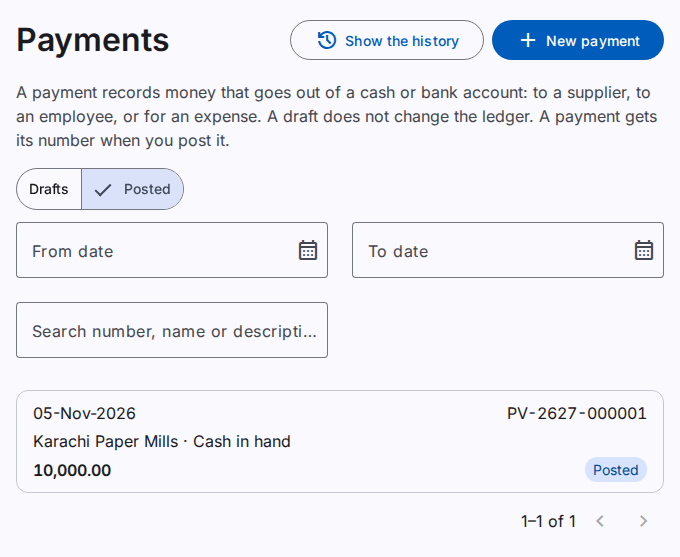
A payment is first a draft. When you post the payment, it gets its number (for example PV-2627-000001) and the ledger gets a journal entry.
Make a payment
You must have the Create payments permission.
- On the Payments page, select New payment. Or, on the page of a party, select New payment.
- Type the Date.
- Select the Cash or bank account that pays.
- In the lines, add who gets the money:
- A Party line for a supplier, an employee or a customer (a refund).
- An Account line for an expense (for example, electricity).
- Type the Amount of each line.
- Select the Instrument. For a cheque, type its number, its date and its bank.
- Type the Paid to name when no line has a party. This field is optional.
- Select Save draft. Or, select Post to save and post.
Tax withheld and other deductions
When you withhold income tax from a supplier, add a Deduction line with the tax payable account. For example, the bill is 100,000 and you withhold 4,500: the supplier line is 100,000, the deduction is 4,500, and the bank pays 95,500. The supplier balance goes down by 100,000.
A negative cash balance
When a payment makes a cash account negative, the product asks you to confirm. Make sure that the cash is really there. A company can change this check on the Settings page (Negative cash balance): warn, block or allow. Bank accounts have no check.
Settle items
A supplier payment settles the oldest open bills first. To settle a specific bill, select Settle items on the party line. Refer to Record a receipt.
To change a posted document in its own month, use Correct and not a reversal. Refer to Correct a posted document.
Reverse and print
To reverse a posted payment, select Reverse and type the reason. To print, select Print. The print can show the previous balance and the new balance of the party, as the print of a receipt. Refer to Record a receipt.
Find a payment
The page has two tabs: Drafts and Posted. Use the search box to find a document by the number, the name or the description. The search finds a number that starts with the text. It also finds a name or a description that contains the text. To search a name or a description, type at least 2 letters or digits. When the list has more than 1000 payments, the page shows "of more than 1000".