
Change the number format of documents
Each document type has a number series. The series gives each document its number, for example JV-2627-000001. The Number series page shows the series of the working company. You must have the View document numbering permission to see the page.
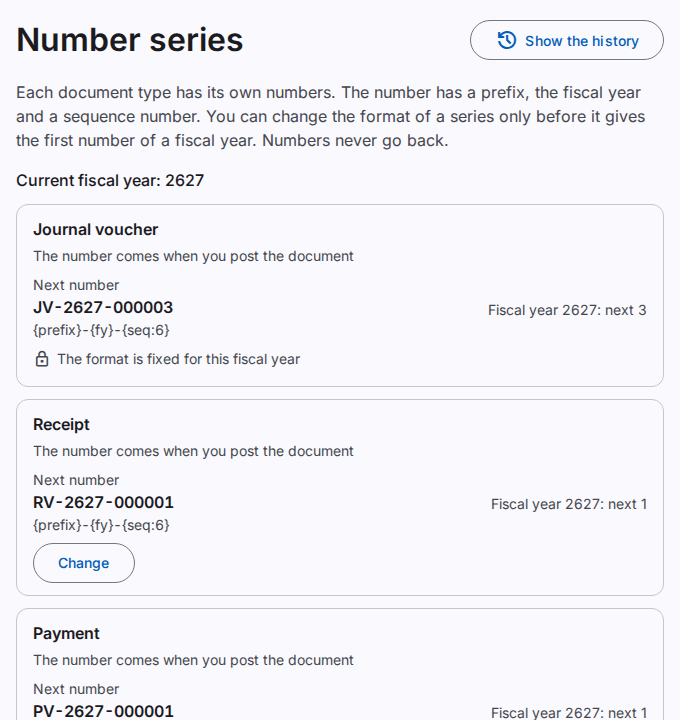
What the page shows
- Next number: the number that the next document of the type will get in the current fiscal year.
- The pattern of the number, below the next number.
- The text below the name tells when the document gets its number. An internal document gets its number when you post it. A document that you give to a customer or a supplier gets its number when you save it the first time.
- Fiscal year 2627: next 5: each fiscal year has its own counter. The counter starts at 1 in each fiscal year.
The numbers of a series have no gaps. Numbers never go back, and nobody can make a counter smaller.
Change the format of a series
You must have the Manage document numbering permission.
Caution: you can change the format only before the series gives the first number of the current fiscal year. After that number, the page shows "The format is fixed for this fiscal year". You can change the format again in the next fiscal year, before its first number.
- Find the document type. Select Change.
- Type the Prefix: 1 to 10 capital letters or digits.
- Type the Pattern. The dialog shows the parts that you can use.
- Read the number below The next number will be.
- Select Save.
- If the Confirm it is you dialog opens, type your Password. Select Confirm.
The page shows "The number format is saved." The next document of the type gets a number in the new format.
The parts of the pattern
| Part | Meaning |
|---|---|
{prefix} |
The prefix. Each pattern must have it. |
{fy} |
The fiscal year, for example 2627 for July 2026 to June 2027 |
{yyyy} |
The year of the document date, for example 2026 |
{yy} |
The year of the document date with 2 digits |
{mm} |
The month of the document date |
{seq:6} |
The sequence number with 6 digits. Use 1 to 12 digits. Each pattern must have it one time. |
Between the parts, you can use letters, digits and the characters -, /, _ and .. A number can have a maximum of 40 characters. Two series of a company cannot have the same prefix.
The history of the number series
Select Show the history to see who changed a format and when. Refer to See the business history.